Pentaton 2.0 is Here
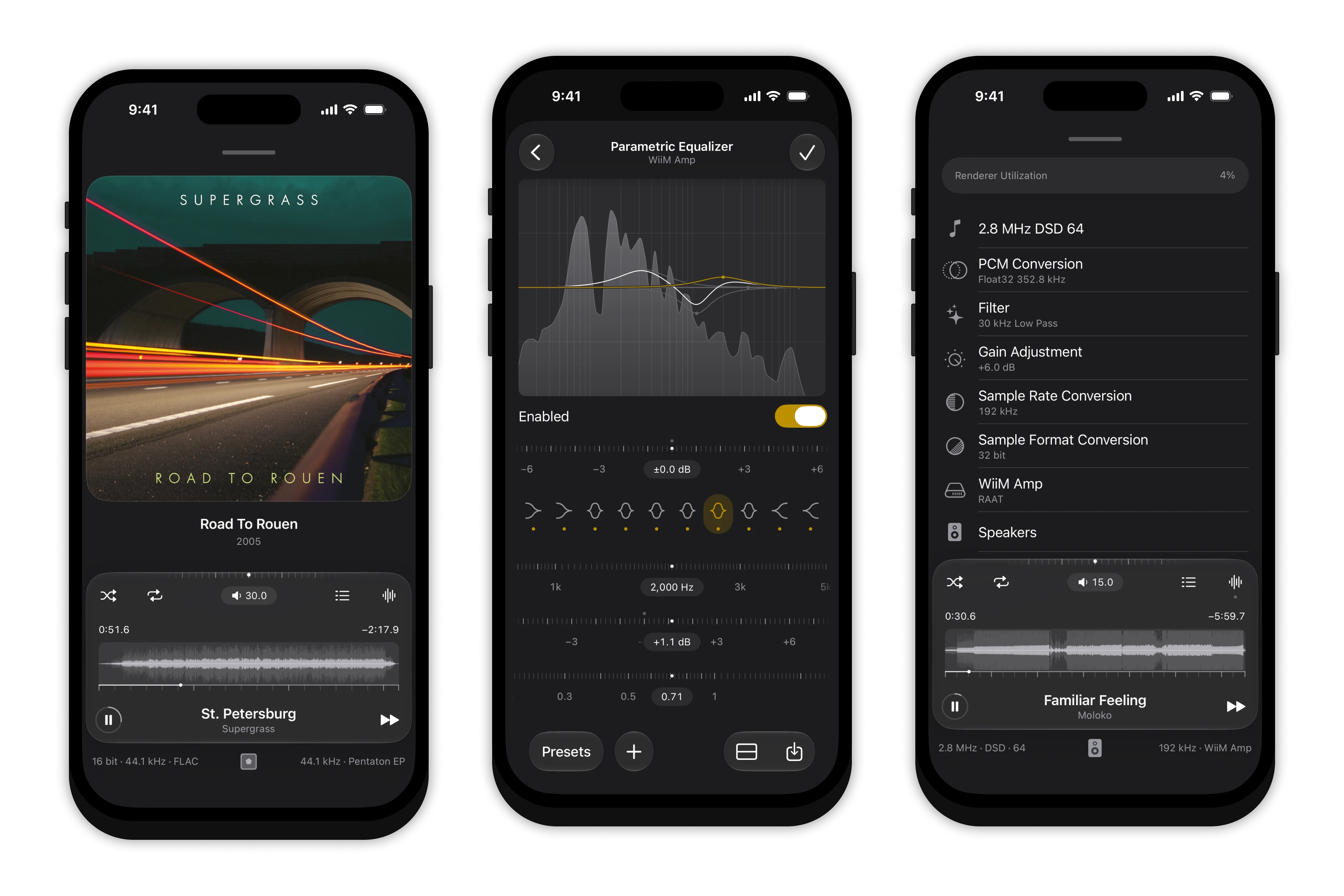
Exactly two years after I wrote the first line, we are happy to announce Pentaton’s first major release, Pentaton 2.0. This marks a significant milestone: Pentaton is now a fully-featured offline audio player.
Let me start with the uncomfortable part first: this release was executed poorly. Around 60 of you dear users had to endure 20 hours without Pentaton and I apologize for that deeply. There is a lot we can take away from this and we’ll make sure to adjust our testing practices accordingly. Thank you for all your support!
Now, onto the good part: let’s see what’s new in Pentaton 2.0.
Precision Audio Engine
We’ve been using Stephen Booth’s SFBAudioEngine since the very first version. It has support for plenty of file formats and has been great to get us off the ground. What we found through the years is that it is very much tied to iOS’s CoreAudio subsystem and really doesn’t want to output oudio anywhere else. This became problematic since we wanted to offer finer control of the audio signal like setting the resampling algorithm and quality parameters.
This led us to build our own bespoke Precision Audio Engine. It still supports the same file formats we used to, with some notable additions like DST compressed DSDIFF files. It also outputs to raw audio buffers which we can then channel to any output, whether it’s CoreAudio or Roon’s Advanced Audio Transport (more on this later).
This allowed us to go even deeper in iOS’s audio stack: we’re now using an AudioUnit instead of AVAudioEngine, and can control the exact resampling process and sample format conversion, so we can offer these settings in the output configurator sheet. We also enumerate connected DAC’s to probe their supported sample rates, so if you do decide to resample, we can now employ strategies like “resampling to highest supported power of two rate”. If this sounds like gibberish to you, fear not: you don’t have to worry about any of these settings if you don’t want to. But if you do, now you can configure your audio chain just the way you like.
Currently we’re still only offering CoreAudio’s resampling algorithms: Balanced and Mastering Linear-Phase, as well as a Minimum-Phase option. These all offer configurable quality between medium and high and maximum. You can learn more about all of this here.
DSD support is also got better: if you decide to convert DSD to PCM, you can set your preferred filter: 24, 30 or 50 kHz Butterworth low-pass filter as well your gain adjustment. DSD-over-PCM is table stakes at this point, but with the Precision Audio Engine, for some outputs you can even use native DSD!
And the cherry on top is our new signal path view: it shows every single processing step happening on your device and, in some cases, off your device too. This can help immensely when trying to understand the consequences of some configuration settings or device combinations.
Support for Roon Endpoints
Most iOS players offer AirPlay streaming since it comes for free: the OS handles audio output. Pentaton does it too, making sure playback is configured for lossless 44.1kHz/16bit, CD quality audio. This has been working great since version 1.0. AirPlay does not do high resolution audio thought. Even with a 48kHz file, you have to resample to 44.1kHz, which while mathematically possible, is not a trivial thing without a lot of CPU processing, when done well.
We wanted to make sure Pentaton users can also stream their high-resolution PCM files and DSD files to their stereo setups. This is especially tricky, as there exists only a single streaming protocol that can do this and is built into enough devices to matter: Roon’s Advanced Audio Transport (RAAT for short). This is a proprietary protocol that streamer manufacturers can adopt, then go through Roon’s certification process, after which their streamer can be used with Roon to stream audio in bit-perfect, high-resolution and DSD formats.
As far as we know, nobody has ever attempted to reverse engineer this protocol. For the purposes of interoperability, we decided to do try it. And it worked! We have captured and analyzed a crazy amount of network traffic between devices to be able to understand how the protocol works. We also created a clean-room re-implementation of the LUA script required to use the endpoint. This is especially important to avoid infringing on Roon’s copyrights.
In Pentaton 2.0, you can use the familiar audio route selector button to list all the AirPlay, Bluetooth and now RAAT devices on your network. Just select one, and your audio will be streamed to it in its original sample rate and bit-depth (when supported). This way, you can also stream native DSD, with no limit on sample rates other than the endpoint’s supported maximum. RAAT also has some other niceties like lower latency (AirPlay has a constant 2 seconds), so music starts faster, and a two-way connection to the endpoint’s controls: turning the volume knob on your FiiO SR11 will change the volume slider inside Pentaton and vice-versa! Such a convenient and satisfying setup.
As far as we’re aware, Pentaton is the only app in the world right now that can do this.
There is one caveat though: the endpoints can decide to enforce code-signing. This means, only scripts (and as a consequence, only sender apps) blessed by Roon can use them. Today, endpoints enforcing this are in the minority, but this could change in there future. We’re hoping this can be something we can convince Roon to reconsider (while still enforcing proper security), as interoperability is everybody’s interest to keep up healthy competition and reduce e-waste.
Audio/Visual Timing
With all the different ways to output music thanks to the Precision Audio Engine, we ran into something interesting: some outputs have virtually no latency, like a USB DAC (20ms), while a pair of Bluetooth headphones can easily have 200 milliseconds. AirPlay famously have a fixed 2 second latency, and RAAT is even crazier: it can be ahead anywhere between 1 to 5 seconds. So when do we show exactly when a new track begins? We think it should show exactly when you start hearing the new track. Easier said then done!
We’ve built a complete clock translation layer into the Precision Audio Engine. This keeps track of the active output’s internal clock versus Pentaton’s presentational clock, keeping this relation up-to-date down the last milliseconds. This allows Pentaton to know exactly when audio becomes audible, no matter the protocol used for the output, and adjust for that. This system is so precise, that you will see every single beat in the spectrum visualizer exactly at the time you are hearing it.
While this sounds like a pretty basic idea (let’s show things when you can hear it), once again, we’re not aware of any other player that goes through this much trouble to make sure audio and visuals remains in complete sync.
Built-in Samba Client
Pentaton relied on iOS’s Files app for accessing music libraries off of your device. This let you connect to your NAS or file server in the Files app and add a folder on it to Pentaton to scan and show. This worked, but had a major limitation: every time you ejected the server from the Files app, your library in Pentaton would break, even if you later re-connected to it. We accepted this as this was just how iOS worked, but always felt we can do better.
With Pentaton 2.0, we decided to implement a custom client that allows you to directly connect to your file server or NAS and add folders from it without ever touching the Files app. This custom client means Pentaton now has a direct line to your server and can re-connect any time you want it to, never breaking the library connection again. We built in a handy browser too, so your Bonjour-advertised servers will show up automatically and you’ll be able to browse to your folder without typing anything.
Then came the crazy part: we went down to deepest bottom of the SMB protocol specification to understand how we could do change detection as fast as technology allows. Turns out, iOS’s SMB clients plays it very-very same, and considering the nature of a music library, you can do much better. So we implemented the fastest recursive directory tree traversal we could think of and fine-tuned the concurrency-level (how much work Pentaton does in parallel) to meet the performance characteristics of most home networks. We also analyzed how metadata is structured in the most popular audio file formats and tuned our client to read large-enough chunks to get these in one network round-trip.
This resulted in a staggering 80-100 times faster change detection and metadata scanning than the Files-app based connection. We encourage all of you to re-add your sources if you do use SMB to see this for yourself. Dropping a new album onto your server should be picked up instantly, no matter the depth of your folder structure.
As a bonus, we also implement iOS26’s ContinuedBackgroundProcessingTask, which allows longer library refreshes to complete even if the app is in the background and not playing audio.
Wrapping up
This is where we’re gonna stop for today, but there is even more. We’re going to show these features individually in a series of videos in the coming days.
For now, happy listening!